
LaTeX vs. Word vs. Writer

I’ve earlier performed a little test, comparing two files: one produced with MS Word, the other with OpenOffice.org Writer. The purpose then was to demonstrate that Word isn’t necessarily such a bad piece of software — it’s just not always used in a way which is likely to give nice results: most people don’t change the default settings of Times New Roman/Arial and ragged right margin, and they apply formatting manually for each new element, which is bound to lead to inconsistencies.

Now it’s time for the next round of tests, this time including another application in the comparison: the “typesetting environment” LaTeX. I will also go more in detail with the points of comparison, not just considering the crude parameters such as font size and page margins, but also taking into account the finer typographical details. In the former test, I had deliberately turned off hyphenation. That led to a discussion about various hyphenation algorithms, and this time, I have decided to turn on automatic hyphenation in all three programs, using the default settings.

The contestants

MS Word probably needs no presentation: the omnipresent causer of headaches over lost or corrupted files; the producer of hoardes of ~WRL2354.TMP files in some hidden system directory (look in C:\Documents and Settings\<User Name>\Application Data\MicrosoftOffice if you don’t believe me); and the single most influential spreader of bad typographical taste in a hundred years, since the previous low point in the late nineteenth century.

OpenOffice.org is the flagship of the open source movement: a free equivalent to Word, which boasts an almost perfect and seamless conversion filter, so that you can edit almost any word file interchangeably in Word and Writer without ever noticing. Oh yes, and it’s free, both as in beer — you don’t pay for it — and as in speech — the source code is open, the file format is open, so you don’t need a particular program to view its files (there are at least three word processors which natively use the same file format, and countless others which can read it).

Both of the “W” programs are so called Word Processors. Some hold that the use of the same word in “Word Processor” and “Food Processor” is no coincidence, and anyone who has been met by a screenful of random characters from a ruined Word file will be likely to agree. They are both parts of huge pieces of software, “Office Suites”, with several integrated applications in addition to the word processor: a spreadsheet program, a presentation program, a drawing program, a database application, etc. The principle is WYSIWYG — “what you see is what you get”. You type a “b”, select bold/italic, and that’s what you see on the screen and on the paper you eventually print out.

LaTeX is a different beast: it is a “typesetting environment” rather than a word processor. First of all, there is no icon on you desktop saying “LaTeX” which you can click on to bring up the LaTeX program. There is no one particular “LaTeX editor” — any editor which can open and save plain text files without messing them up by adding Microsoft’s secret codes at the end, can be used. Already this is a concept which is foreign to most people who have gotten used to the modern point-and-click way of doing things. (True story: most of the people I have sent LaTeX files to, have complained that they could not open them. Here’s lesson #1 today: just because Windows doesn’t automatically know which program to use, doesn’t mean that there is no program to use).

Edit: Judging from the many comments I’ve received about this parenthesis — most of them along the  lines of “What kind of an idiot sends LaTeX files to ordinary people?!?” — I think a clarification is in place. I’m referring to a handful of occasions when I’ve needed an author to check some little detail, or a proof-reader to go through a text. I’ve sent them the files — accompanied with PDF files — along with instructions to disregard all the \command{this} and \environment{that} rubble. I don’t expect them to install some tex variant and process the file, just to be able to open it, since it’s simply a plain text file. These are people who think that word files live in Word and that it must be the same way for all other kinds of files too.

In fact, LaTeX is much closer to being a “Text Processor” than the other two, it just does the processing much better: You feed it some raw materials, and out comes, not scrambled eggs, but a whole pie complete with chicken and cheese, pefectly seasoned and baked precisely long enough to give it a nice crispy surface without getting burned.

It fills the outer limits of the area where word processors occupy the middle ground. The “raw material” in this case is text which looks like this:

\noindent\lettrine{I}{t is easy} to be seduced by Dylan's lyrics:
\textit{they} were essential when he was nominated for `Voice of a
Generation', and \textit{they} stuck in the fans' throats when he converted

It may look cumbersome, and it is, but the reward comes when you process it and print it out. It then becomes clear why it’s called a typesetting environment: LaTeX is in fact a tiny little typographer, trained by Gutenberg (he’s very old now) and still upholding the craft with pride. A Word document may look nice on the screen, but no publisher with any self respect would ever publish a book directly from a word file.

The document

Layout in Word, Writer, and LaTeX (pdf file)

For the test, I have used two pages from an upcoming chapter from “Things Twice — the book”. I have tried as well as possible to use exactly the same layout in all three programs. In theory, this is just a matter of writing down settings in one place and applying them in the other, but in practice, it is slightly more involved. In Word, the header and footer are not considered to be part of the page area: if you want the header to start 3 cm down on the page, you will have to indicate a 4 cm upper margin and a 1 cm header, which is a strange way of dealing with the page layout parameters, and one which can cause quite a lot of frustration and trial and error. But those problems aside, I have used a page area of 12x18cm, a font size of 11.5/13.2pt (i.e. 1.7pt leading), a three-line drop cap for the first paragraph, and a slightly stylish, book-type of chapter heading. The font is Adobe’s Garamond, the most beautiful font in the world.

The pdf file contains the following four versions:

  1. MS Word
  2. OOo Writer, produced under Windows.
  3. OOo Writer, produced under Linux.
  4. LaTeX, produced with tetex, under Linux.

So how do our contestants fare? At first sight, all the versions seem pretty equal, which should not be surprising, since all the brute settings are the same. The page number on the front page is a little lower in the Word Processors, but that’s because of an oversight on my part, not because of intervention from the programs.

But let’s look a little closer.

Small caps

The first major difference appears in the subtitle. It is set with small caps. Small caps are a separate set of characters where the lower-case letters have the same shape as the upper-case, but the same size as ordinary lower-case letters.Most fonts don’t contain any small caps. If they exist for the font in question, they are usually supplied in a separate font file, but neither Word nor Writer can handle them directly. Instead, they solve this by taking the capital letters and scaling them down. This may seem like a good idea: why double the work? but there are some problems, which the W/W versions show.

There is no fixed proportion between upper- and lower-case letters. Some fonts have high ascenders (the long lines in letters like “k”, “l” or “M”) and a small “x-height” (the height of — you guessed it — a lower-case “x”); others may have shorter ascenders and bigger “x”s. But a word-processor has to make some choice, and Word has chosen to let the lower-case small caps be 80% of the upper-case letters, whereas Writer uses c. 66%.
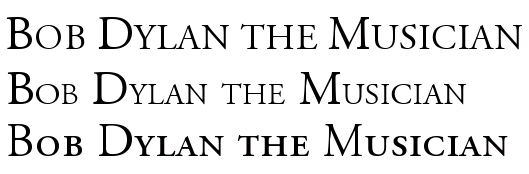
Small-Caps in Word, Writer, and LaTeX

Figure 1: Small caps in Word, Writer, and LaTeX

In this particular font (Adobe Garamond), the ratio between upper- and lower-case small caps is almost exactly the same as in Writer, and one would think that Writer’s version would therefore look good, but it doesn’t. All letters in a font are of course designed to look good at their correct size, but when they lose one third, the lines become way too thin. They stand out as the only element on the whole page with a different “colour”, the typographical term for how the ink is distributed on the page. It is apparent in the subtitle, but it becomes even more painful in the first couple of words, where the fake small-caps look like starved post-war kids alongside the healthy regular letters.

Word’s solution is slightly better, but has its own problems. First, the difference between upper- and lower-case letters is so small it is almost negligible. And secondly, together with regular text, they become much too big. This may be a minor problem since their function is to stand out from the rest, but the combination “too tall and yet so skinny” is forgiveable in a teenager but not in a full-grown office application.

Now turn to LaTeX, which uses the characters which are designed specifically as small-caps. Notice the color: it’s the same as the rest of the text. There is a clear difference between upper and lower case, and although the letters are about the same height as Writer’s “small-caps”, they look infinitely much better, because the lines haven’t lost a third of their weight.

Latex: 3, Word: 2, Writer: 1

Numerals

While we’re on the subject of letter shapes: a proper font should contain proper numerals, but most don’t, at least not in places where simple programs like Word can find them. The number shapes in the two Word processor files are fine for tables, phone books, and math exams, but they are not designed to be part of a running text.

What you will find in a book like this, is the shapes in the LaTeX version. This is not because the LaTeX font is different from the one W&W use (in this respect; in many other respects it is), but because Latex knows where they are and you can order it to use them. W&W only knows about one set, and uses that. (In the Writer-Linux version, I have used a version of the font where I have moved the nice typographical characters to the place where tabular ones, which I will never want to use, are usually found.)

Latex: 3, W&W: 1

Ligatures

But wait: there’s more. Some letter combinations are more difficult than others. The letter “f” is particularly troublesome, and therefore, there’s a long tradition — back to Gutenberg, actually — of making special characters for the combinations “fi” “fl” and “ff” (and “ffi” and “ffl”) — so called ligatures. Most fonts actually have these, but again, W&W doesn’t use them. This is a consequence of the WYSIWYG paradigm: in order to produce the same output on screen as in the finished file, the word processor will have to change two characters — “f” and “f” — into one — the “ff” ligature — on the fly, and be ready to change that again into the three-character ligature “ffi” if the next input is an “i”. With today’s processing power, this should not be a problem, but when these programs were born, this would have slowed down the process too much, and a 600-year long tradition of typographical cleanliness was thrown out the window (example; left side).
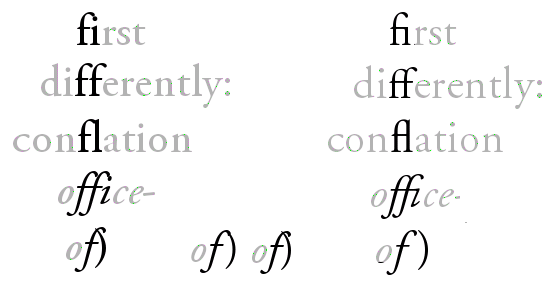
ligatures1.png

Figure 2: Ligatures in Word (left) and LaTeX (right)
For LaTeX (right side), this is no problem, since the input and the output are two different processes. With all the visual pollution in today’s printing world, it may seem a small thing, but once one has gotten used to seeing niceties like the italicized “ffi” in “office”, one cringes when one sees the crash site that W&W can sometimes produce.
And while we’re on the topic of crashes: have a look at the last example: italicized “of” followed by an upright parenthesis: of). It is almost bound to create a mess. Word certainly does, with the linux version of Writer close behind. Strangely, the Windowpeoples version has a better solution, but still with a clash. Again, LaTeX is the winner, with a clear separation between the characters.

EDIT: It has been suggested to me that MS Office 2007 has the option to enable typographical numerals and the ligatures if the font provides them. When the article was written, I didn’t have access to the new beast from Microsoft. Now I have, and if this is in fact featured, I haven’t been able to find out how. A default document still prints out like in the images above.

“Badness”: laying out lines and paragraphs

These are all nice details having to do with how to deal with characters. But the greatest difference between the two word processors and LaTeX, is in the area of paragraph and line formatting. Most word processors adjust the inter-word space line by line, by filling up each line as much as possible. But what if the next line ends with some indivisible, long words? In that case, the line-by-line approach becomes doubly bad: the second line will have big holes — bigger than necessary, even — and the contrast between an overstuffed line and a Swiss cheese line is a death-blow to even page colour.

LaTeX takes a different approach. Instead of fixing the lines, which are just random segments of text, the whole paragraph is considered, and if a problem at the end of the paragraph can be solved by dividing a word differently in the beginning, then that’s what will happen. This prevents the problem with one tight line followed by a loose.

There are some examples of this in the text. None of them are catastrophic, but at least they illustrate the problem. In the second paragraph, W&W hyphenate “atten-tion”, cramming as much of the word as possible into the first line. But at the end of the next line, there is the word “meaningfully”, which cannot meaningfully be split so that any part of it will fit on the second line, which must end with “cannot”, leaving a number of holes in the line. LaTeX, having looked at the whole paragraph before making a decision, knows this, and divides “at-tention”, in order to distribute the extra space more evenly.

The same is the case in the next paragraph, where there would have been room for the whole “performance” on the third line, as Word has done, but that again gives holes, which LaTeX avoids by dividing “perform-ance”. Writer has somehow managed to get one more word into the fourth line, but there are lines with holes later on in this long paragraph, and they may have been caused by the zealous space-saving earlier.

In LaTeX jargon, this is called “badness”. If LaTeX comes across a paragraph which it cannot divide in any good way, it will give a warning, in effect saying: “as the text now stands, this is impossible to make nice. Do something! Rewrite!”. This is a tremendous advantage: when one has compiled a document, one gets a list of the places where there are “badnesses”, which one can then correct manually. I have edited books of 3–400 pages, and the ability at a glance to review all the dubious places is a time-saving miracle — on top of the comfort of knowing, when all is corrected, that you (i.e. LaTeX) haven’t overlooked anything.

Hyphenation

Hyphenation is a necessary evil: they maintain the flow of the line at the cost of breaking a word in two. There is also the danger of splitting at wrong places, because hyphenation does not always follow strict rules.

The hyphenation points chosen by the three programs are all ok, as far as I can judge. Word has followed the American practice of disregarding the original meaning of compound words, giving beauties like “bi-ography” in the last paragraph, and also the horrible “danc-ing” on the middle of that page. But both are allowed, so that’s ok.

LaTeX has been instructed to follow the British English rules, and so we get “perform-ance” instead of “perfor-mance” on the first page. The only dubious decision is “signific-ation”, which according to Merriam-Webster (with US rules) should be “sig-ni-fi-ca-tion” and according to Oxford Advanced Learner’s Dictionary “sig-nif-ica-tion”. So we actually have an error… The explanation may be that the other “signific-” words, “significant” and “signification”, split after the “c”.

Writer follows LaTeX concerning “signification”, but other than that has unproblematic decisions.

“Uncials”/Drop caps

The first paragraph begins with a drop-cap, an initial covering three lines. All three programs do it slightly differently.

Writer’s “I” is too big; it breaks the square of the text area. Word’s is better: the top of the “I” aligns with the height of the ascenders, which is acceptable.

One thing to keep in mind concerning drop-caps is that the magnification of the letter also means that the space around it grows, and with some letters, this may call for some manual adjustment of the position of the letter, so that it will look right instead of being mathematically right. An “O” will look smaller than it is; “A” and “W” have limbs sticking out in various directions, which may trick the eye, and so forth. In other words: there must be an option to fine-tune the size and position of the initial letter. Both Writer and Word give you the option to adjust the space between the letter and the rest of the text, but nothing more than that. LaTeX, on the other hand, lets you configure everything. In this example, I have increased the size of the “I” by a fraction — mainly because I could…

Points and space

I have to confess: I have cheated — on one point. The ellipsis points at the end of the first paragraph — they didn’t have to end up being separated from the “cetera” to which they belong. I could have inserted a hard space between the word and the dots, but I didn’t, for two reasons. One is that most people don’t: either they type word–space–three dots, which the program may or may not replace with the “ellipsis” character (consisting of three dots, but as a single character), or they insert the ellipsis character themselves — after a space. And the result may be as in the W&W versions.

The other reason is to get a chance to illustrate one further point: regardless of how one deals with the ellipsis in the word processors, it will stand out, some way or another. Use three dots, and they will come too close together. Separate them with a space, and they will come too far apart. Use the single-character ellipsis, and things are slightly better, but the three dots are still closer together than the surrounding spaces. This will only get worse if there are extra holes in the line owing to bad paragraph justification.

The LaTeX dots remedy all these problems, because they neither use a fixed character, nor dot-space-dot-space-dot, but something in-between: single dots, separated by a fixed space, less than a full space. In this case, I have even adjusted the space to my liking, both between the dots and the distance to the previous word.

The same can be said about the troublesome title of the Hymn of a Generation, ‘The Times They Are A-Changin” with the two apostrophes in a row. It’s bound to be ugly whichever way one treats it, but one can get decent results. For the LaTeX version, I have used a 1pt space. I could have done something similar in the other versions, but I didn’t, again because it’s not what the default user — or even the advanced user — would do. I’ve used a normal space, which is too much.

Verdict

Time to sum up the evidence. I think I stopped handing out point at some point, but that doesn’t matter: I can form a verdict without them.

If the visual output is the decisive criterion, there really is no competition: LaTeX wins on all counts. Word and Writer follow on a respectful distance: they both fulfill the most basic tasks reasonably well, but fail flat out on others. Word has a slight edge because of the nicer small caps and the drop-cap, but the difference between Word and Writer are negligible; and on other points, such as the italicized-f-plus-end-parenthesis, Writer wins, so let’s call it a tie.

This short example has of course only scratched the surface of what the three applications can do. Because of the integration with the other elements in the office suits, Word and Writer can handle embedded spreadsheets, drawings and diagrams, and similar effects, and including images is very easy, but once you try to place them where you want them on the page, the result tends to be horrible. LaTeX is the industry standard for mathematical formulae, places images where they should be, and can do just about anything with a paragraph (try to make a justified paragraph with the last line centered in Word…). All in all, it is probably fair to say that there are few limits to what you can do in any of the three alternatives if you know them well, but LaTeX always produces the best results.

Another strength of LaTeX lies in the handling of large documents, where the separation of editing and processing can be a lifesaver. I’ve had 400-page documents crash in Words more times than I care to remember, and the final stage of producing such a book is a desert journey on the verge of a nervous breakdown both for the author and the computer. Not so with LaTeX: no matter how long the text is, since it’s “only” plain text, and all the heavy formatting lies outside of the document, the concrete interaction with the text is always unproblematic. Behind the scenes, the same paragraph for which I gave the LaTeX code initially, looks like this in Writer:

<text:h text:style-name="ChapterNumber" text:outline-level="1">Chapter 10</text:h><text:h text:style-name="ArticleTitle" text:outline-level="3">The Uneven Heart</text:h><text:p text:style-name="ArticleSubtitle">Bob Dylan the Musician</text:p><text:p text:style-name="Standard"/><text:p text:style-name="Standard"/><text:p text:style-name="BodyTextDropCap">I<text:span text:style-name="T1">t is easy</text:span> to be seduced by Dylan’s lyrics: <text:span text:style-name="T2">they </text:span>were essential when he was nominated for ‘Voice of a Generation’, and <text:span text:style-name="T2">they</text:span> stuck in the fans’ throats when he converted to Christianity. Equally easy is it to question his musical abilities: ‘He can’t sing’, ‘he can’t play the harmonica’, ‘he only knows three guitar chords’, ‘his lyrics are good, but I can’t stand the voice’. Et cetera <text:span text:style-name="T3">… et cetera …</text:span></text:p>

Since the program has to deal with all that, constantly, a long document can become a huge workload.

That said, writing in LaTeX isn’t a bed of roses. It can be a hassle to get anything other than text into the document; looking at the extra code all the time is a nuisance; setting up the basic document properties, which is done with a couple of clicks in W&W, can be a long process with a manual in your lap; there is ample room for error to sneak into the code (and it is code; writing in LaTeX is a kind of programming).

For anything but short memos, all this is outweighed by the beauty of the final result. But this isn’t even the main reason why working with LaTeX is such a thrill. It has to do with control, with the difference between having a program which invites you do what you want, and one which you must frequenly fight to make it yield to your wishes if you wish anything which goes beyond the defaults. It is easy to produce good results in Word, but it’s hard to produce anything that’s better than good. In LaTeX, it’s the other way around: it’s cumbersome to get even to the default result, but once you’re there, it’s great, and from there to the truly magnificent specimens of typography it’s just a series of small steps.

It’s not having defaults that’s the problem with Word — in fact, LaTeX is nothing but a huge set of finely tuned defaults — it’s the assumption that you are and should be happy with that. It’s the difference between empowering you and crippling you.


94 Responses to “LaTeX vs. Word vs. Writer”

  1. alexsk - blog » Layout i Word, Writer og LaTeX UNITED STATES WordPress 2.2 Says:

    [...] Fandt denne længere blogpost om det layout som hhv. Word, Openoffice Writer og LaTeX producerer. Manden bag artiklen har forsøgt at sætte samme tekst i de tre programmer med samme fonte og sideopsætning. Ikke overraskende falder resultatet ud til fordel for LaTeX. Kommentarer til denne post [...]

  2. p-Code » LaTeX tips & tricks NETHERLANDS WordPress 2.1.3 Says:

    [...] During my internship I quickly got frustrated with OpenOffice.org Writer. Halfway through I switched to LaTeX and never looked back. LaTeX is far from perfect, but it’s a hell of a lot better than any random wordprocessor. There is a very good introductory text available on LaTeX, it’s called lshort. Here are some good articles on why you should use LaTeX. [...]

  3. Joerg Daehn GERMANY Windows XP Mozilla Firefox 2.0.0.5 Says:

    Thanks for the thorough comparison. And I have to second you on Garamond: it is by far the best, followed by Palatino and Minion in my opinion.

  4. Joerg Daehn GERMANY Windows XP Mozilla Firefox 2.0.0.5 Says:

    Could you please tell us how you made use of Garamondin LaTeX?

  5. eyolf DENMARK Linux Mozilla Firefox 2.0.0.6 Says:

    Sorry for the long delay. I had to move the blog…
    Anyway: First of all you need a licenced set of the font Adobe Garamond Pro, the type1 version, with all the different types of files (.afm, .pfm, and .pfb). Then go to http://www.ctan.org/tex-archive/fonts/metrics/w-a-schmidt/ and download the file called pad.zip. That contains everything you need to convert the type1 files to proper latex font files, including detailed instructions. The most tedious part is renaming all the files and putting them all in the right location, but it’s worth the effort :)
    Exactly where that “right location” is will depend on how your version of latex is configured. I put them in ~/.texmf-var, for what it’s worth.

  6. Jim Hefferon Ubuntu Linux Mozilla Firefox 2.0.0.6 Says:

    Thanks for the very readable article. For people were intrigued by the article and want to try LaTeX: have a look at http://www.ctan.org/starter.html .

  7. D UNITED STATES Windows XP Mozilla Firefox 2.0.0.6 Says:

    First instance of “loose” should be “lose”.

  8. eyolf DENMARK Linux Mozilla Firefox 2.0.0.6 Says:

    Thanks. Corrected.

  9. Joel UNITED STATES Windows XP Mozilla Firefox 2.0 Says:

    Have you tried lyx? Do you have an opinion on it?

  10. eyolf DENMARK Linux Mozilla Firefox 2.0.0.6 Says:

    Yes, I should perhaps have mentioned it in the article. I think it’s a very nice frontend to LaTeX — very comfortable to work with, and nicely customizable. If you just use the standard classes or some of the included templates (article, book, various letter types, memoir and koma templates, etc.), you hardly need any other LaTeX editor. You have the convenience and visual cues of the word processor combined with the underlying expertise of LaTeX. If you have special needs for the preamble, that is also easily catered for. There is a nice outline panel, and you can view the source code directly if you want to.
    When I have been reluctant to use it in my day-to-day work, it is for two reasons. One is the editor part. I have come to expect the versatility and power of vim in dealing with text: moving around, selecting, find/replace — the kind of functions that simplifies work, also for a non-programmer like me. Here, LyX has more or less the same crippled sub-set of functions as the other word processors: no search with regular expressions, a primarily mouse-based interface with keyboard shortcuts which mostly are just menu accellerators, etc. It’s fine for writing text, but less adequate for working with it.
    It might have been nice to be able to open the LyX files in vim, but that’s my other objection: the files that LyX works with are barely human-readable, and they are not plain TeX, but a format of its own. Sure, one can export to and import back from LaTeX, but it’s cumbersome, and it’s not entirely seamless.
    But for the kind of things where most people use Word, I’d definitely go with LyX instead. Highly recommended!

  11. Zack UNITED STATES Windows XP Mozilla Firefox 2.0.0.6 Says:

    I like the Latex output, but it always poses difficulties when I want to do anything out of the ordinary. I have to ask people online how to do things, because it seems there is no good knowledge base other than other users. For instance, I wanted to create a 3-column table with differently sized columns. Easy in OO and Word, but hellish in Latex. Also, Latex’s default spacings are not what is often needed. Vertical gaps before & after enumerated lists may be a problem. So, although I think Latex is a good idea, I think it needs to be properly supported so that out of the ordinary needs find an answer quickly.

  12. Vic Windows XP Mozilla Firefox 2.0.0.6 Says:

    Just a note, you spelled “application” “appliation”.

  13. sl CANADA Solaris Mozilla Firefox 2.0.0.5 Says:

    “diefference” needs correcting…

    Thanks for the article. Kerning would be another one I would cover.

    Cheers.

  14. nick b. Mac OS X Safari 125 Says:

    You should try Pages: http://www.apple.com/iwork/pages/

    Its output is pretty close to that of LaTeX… and all that without all the font conversion pain.

  15. subcorpus MALDIVES Windows XP Opera 9.23 Says:

    i’ve never heard of latex …
    guess i need to check it out …
    worked nicely for you …

  16. Dave Hysom UNITED STATES Windows XP Mozilla Firefox 2.0.0.6 Says:

    Thanks; great article!

    As a researcher, I’m a longtime fan of latex. Basically, ’cause I don’t want to be distracted while I’m writing by seeing *what the darn thing is going to look like.* With Latex, I know it’s going to look good. And I can always view it with a couple of keystrokes.

    Sigh. As a CS researcher at a national lab, a few months ago my PI told me that I *would us M$ word* to write my article (note, I was the first author). I thought this was so much bullcrap, I never wrote it. Now that my PI has left the lab, I’m happily writing again.

    Moral: those who can use Latex. Those who can’t become project leads.

    Thanks for listening, I’m off my soapbox for now :)

    Latex rocks! – Dave

  17. mclaren Windows 2000 Opera 9.50 Says:

    Those of you who use linux can use Lyx, a WYSIWYG program for formatting and entering LaTex text. It’s not exactly a word processor, but it’s vaguely similar — and offers the advantage of a nice GUI with many formatting options similar to what you find in professional page layout programs. Best of all, it’s free.

  18. nostradamnit FRANCE Windows XP Mozilla Firefox 2.0.0.6 Says:

    Good article, thanks.

    Lyx is available for Windows as well, and is a nice middle ground between W(riter)(ord) and LaTeX, though it does require a bit of a paradyne shift.

    Grammar Troll comment: second sentence in section The Documents should read “as well as possible”.

  19. Ian UNITED KINGDOM Mac OS X Opera 9.50 Says:

    Hi, I’ve dipped into the LaTeX world sometimes, but I was always hugely put off by the encoding mess and failure to support OpenType fonts. Ideally we should be able to use unicode and let OpenType features do the work for us. Anyone know if LaTeX is moving into the 21st Century with regards to unicode/opentype — I would be *very* happy if it has/was…

  20. Ian UNITED KINGDOM Mac OS X Opera 9.50 Says:

    Sorry to answer myself, but it looks as if the last year has been very kind to modern text/font systems in LaTeX:

    http://scripts.sil.org/cms/scripts/page.php?site_id=nrsi&id=xetex

    Look forward to playing with this…

  21. Your resume in Latex | Minimalia NETHERLANDS WordPress 2.2.2 Says:

    [...] I decided to explore other viable solutions and I finally took the (right) decision to use Latex. Here you can find an interesting article highlighting the main differences between LaTex and Microsoft [...]

  22. Michael CANADA MEPIS Linux Mozilla Firefox 2.0.0.3 Says:

    Aside from Latex, there is also Lout – similar idea (formatting mark-up right in the text), but IMHO more coherent, more compact and easier than Latex. Drawbacks are smaller user base and fewer tools (e.g. conversion to HTML, DocBook). It comes with very good documentation straight from the horse’s (i.e. main developer’s) mouth – well worth checking out.

  23. Mark UNITED STATES OpenBSD Mozilla Firefox 2.0.0.7 Says:

    Thanks for this article, I’m definitely bookmarking it for reference the next time someone asks me why I go through all the “trouble” of using LaTeX rather than a WYSIWIG word processor.

    nick b. is correct that iWork’s Pages word processor does some better typography than Word and Writer. In particular, it will apply Garamond Pro and other fonts’ ligatures by default, however it does not appear to format paragraphs to minimize total “badness” like TeX does, and lacks quite a few of TeX’s other best features as well. The deal breaker for me, though, is that Pages doesn’t provide support for inline equations, making it useless for my line of work – this is one of LaTeX’s real strengths, and it is the reason I started working in TeX to begin with.

  24. Andreas DENMARK Mac OS X Mozilla Firefox 2.0.0.7 Says:

    In my experience Pages is even worse than Word or Writer at handling large documents. Even at 20+ pages it has serious difficulties.

    I haven’t tried the latest Pages, though.

  25. arnuld INDIA Linux Mozilla Firefox 2.0.0.8 Says:

    Hi,

    very good technical article which sparked my interest in LaTex and TeX. BTW, I was much intereste din GNU Documentation Format known as Texinfo. Have you any thoughts on:

    LaTex vs Texinfo

    :)

  26. arnuld INDIA Linux Mozilla Firefox 2.0.0.8 Says:

    OOPS! … I forgot to mention that you are responsible for destroying the friendship of “arnuld & Word Processors”

    ;)

  27. eyolf DENMARK Linux Mozilla Firefox 2.0.0.8 Says:

    I’m very sorry for that — my apologies… As a matter of fact, word processors aren’t necessarily that bad. A follow-up article will be called “Who’s afraid of WYSIWYG?” where I will tear apart the arch-argument against WYSIWYG editors: that they blur the distinction between style and contents, and, conversely, that writing LaTeX code in a plain text editor will help you concentrate on the contents and not worry about the style — which is utter BS. Try to concentrate on the contents in the maze of tags and braces that an average LaTeX file is…
    I know, I’m speaking with two tongues here. I do so mainly out of irritation: that W&W don’t use the options that are there, e.g. in the fonts (for the most part); that they don’t come with a proper editor (one might have thought that that would have been the first thing that a Word Processor would do — let you edit your text efficiently); that LyX uses its own format on top of LaTeX so that it is not really a LaTeX frontend; that the LaTeX fanbois are so stuck in their “concentrate on contents and not style” line that they can’t see that style is also contents (e.g., if I see a line in bold (style), I know that that’s a heading (contents), and that helps me organize my thought and my writing); etc.
    An option which may be useful to keep the best of both worlds, is to use OOo for the writing itself and then export to LaTeX and do the final editing and printing there. This can be done directly with the latest version of OOo, or, if you want more control, with the excellent tool writer2latex. I do this quite a lot. The only problem is that there is no way of doing a clean round-trip conversion: you can’t easily go back to OOo again once you have done any editing of the LaTeX file.

    Oh well… Some people are never satisfied, are they…

  28. Martin Schröder GERMANY SuSE Linux Mozilla Firefox 2.0.0.8 Says:

    First: Thanks for the test.

    You don’t say if you have used latex or pdflatex, though. And if you used pdflatex, I believe you used an older version (since you used tetex). Could you repeat the latex test with pdflatex from TeXLive2007 and use the microtype package? It will really blow the contestants to pieces… :-)

  29. eyolf DENMARK Linux Mozilla Firefox 2.0.0.9 Says:

    I used latex, that is true. I’ve since upgraded to TeXLive, and I can confirm that the results are even better with the microtype package. Thanks for the tip!
    I can’t easily upgrade the test itself, since the paper is work-in-progress, and it has progressed since then and stupidly enough I haven’t saved the files in the version for the example. But I will make another two-page sample for comparison.

  30. Gabriel Ubuntu Linux Mozilla Firefox 2.0.0.11 Says:

    How do you do Drop Caps in LaTeX?

  31. eyolf DENMARK Linux Mozilla Firefox 2.0.0.11 Says:

    Use the Lettrine package:
    http://www.ctan.org/tex-archive/help/Catalogue/entries/lettrine.html

  32. Gabriel Ubuntu Linux Mozilla Firefox 2.0.0.11 Says:

    Thanks

  33. Yiorik REPUBLIC OF MOLDOVA Windows XP Internet Explorer 6.0 Says:

    Nice Site!

  34. Michael UNITED STATES Mac OS X Safari 523.12.2 Says:

    Any experience with LaTeX to HTML conversion?

  35. Prabu Rajasekaran INDIA Windows XP Safari 525.13 Says:

    LaTeX will be worthy addition to the skills I’m planning to build up in the coming year. I always wanted to know about book making and this has come just in time when I’m helping a friend create a manual.

    Thank you.

  36. Mike UNITED STATES Ubuntu Linux Mozilla Firefox 3.0.3 Says:

    I have heard of LaTeX a number of times throughout the years. I found this article very interesting, but I had trouble with the pdf link.

    Could you please repost the comparison pdf? Thanks!
    -Mike

  37. Chris UNITED STATES Ubuntu Linux Mozilla Firefox 3.0.3 Says:

    Michael: Pandoc ( http://johnmacfarlane.net/pandoc/ ) is a very cool Swiss Army knife sort of application. It can convert between *many* different formats.

    And ‘latex2html’ is perhaps the canonical way to do this: http://www.latex2html.org/

  38. Mike UNITED STATES Ubuntu Linux Mozilla Firefox 3.0.3 Says:

    Whoops, browser mishap. :-)

    Thanks for the article

  39. Bill Mill UNITED STATES Mac OS X Mozilla Firefox 3.0.4 Says:

    “letters.Most” should be “letters. Most”.

    I’ve never been able to get over the learning curve for LaTeX (I tried LyX for a while too), when all of my meaningful communication occurs over the web. Bad for typography, much better for communication.

  40. LaTeX vs. Word vs. Writer FRANCE WordPress 2.6 Says:

    [...] ★ There is no doubt that LaTeX produces way more beautiful documents than Microsoft Word, even if Word defaults settings are changed. [...]

  41. Allan UNITED STATES OpenBSD Mozilla Firefox 2.0.0.12 Says:

    I’d like to mention other typesetting packages, for those interested in alternatives to word processors:

    - troff (http://www.troff.org): the typesetting package developed at Bell Labs by the people who brought us Unix. If memory serves, the first Unix system was set up to process patent applications, and troff was developed to typeset the documentation. (My first Real Job involved typesetting manuals for SCO using troff.)

    - groff (http://groff.ffii.org/): the portable, freely-available troff clone from the GNU folks.

    - cl-typesetting (http://www.fractalconcept.com/asp/cl-typesetting): a typesetting package written in Common Lisp.

    - I think there’s another typesetting package written in Scheme or CL, but its name escapes me at the moment.

  42. Wednesday lunch buffet « Authsider WordPress MU Says:

    [...] take on typography by Eyolf Østrem in his blog things twice, comparing LaTeX vs. Word vs. Writer. Good [...]

  43. Hraban GERMANY Mac OS X Safari 525.22 Says:

    If you want Unicode and OpenType, use XeTeX or LuaTeX, preferrably not with LaTeX, but ConTeXt.
    Unfortunately ConTeXt lacks documentation, but it’s the future. And for those who know to use it already the present for some time.
    see contextgarden.net

  44. Seitenhiebe » Blog Archive » Hermann Zapf und LaTeX GERMANY WordPress 2.6.2 Says:

    [...] ein Wort zu LaTeX: Bei einem Vergleichstest schneidet LaTeX natürlich auch am besten ab. (Word wird bezeichnet als “and the single most [...]

  45. Dario UNITED KINGDOM Mac OS X Safari 525.27.1 Says:

    Good job, Eyolf.

    For a similar comparison with downloadable examples, considering typographical differences between Word and XeTeX, you may want to look at: http://nitens.org/taraborelli/latex

    For those interested in advanced OpenType typography in a TeX environment, I’d strongly recommend XeTeX with the fontspec package which, as I point out in the document above, provides a very comfortable user interface to the most common OT features (on top of full Unicode support, which is essential for non-Western users). Microtypography similar to pdfTeX is unfortunately not supported in XeTeX as yet.

    As for ligatures (and kerning!) I confirm that they *are* supported in Office 2008, but disabled by default, which makes them pretty useless. Moreover, long documents rendered with ligatures randomly crash the application (I run the Mac Office version on Leopard), which suggests that support for these features is still, let’s say, ‘experimental’.

    It’d be great to see a comparison between *TeX and Adobe InDesign in typographical rendering if anyone is familiar with both.

  46. Latex vs. Word vs. Writer « Mbpfernand0’s Blog WordPress MU Says:

    [...] escritura, LaTeX Mi voto va para el LaTeX, a veces hasta extremos ligeramente absurdos pero en LaTeX vs. Word vs. Writer hacen una comparativa y parece que lo que opinaba es razonable. No habla de las posibilidades de [...]

  47. Bernhard Schulte GERMANY Debian GNU/Linux Mozilla Firefox 3.0.6 Says:

    There is a rather nice specialized editor in the Debian repos which is called Texmaker. The project website is at http://www.xm1math.net/texmaker

    It is not WYSIWYG but has menues from which you can quickly click together a preamble, insert formulae, run a test-built etc.. It lacks the power of Vim as far as manipulation of large chunks of text is concerned and it is a bit mouse-centric. So my workflow mostly looks like this:

    Use Texmaker to click-produce a preamble and then shove it over to Vim for the heavy lifting.

    I tried the LaTex plug-in for Vim, but that did strange things to the editors behaviour.

  48. Borbus UNITED KINGDOM Ubuntu Linux Mozilla Firefox 3.0.7 Says:

    Very nice article. I always knew LaTeX was technically superior to most other typesetters/word processors because people that knew about typesetting had told me so. I never really had any objective evidence to back that up but now I do, so thanks!

    Being a programmer I have always felt much more comfortable editing markup with a text editor (be it HTML or LaTeX etc.) than using some WYSIWYG program. I do not think LaTeX is just for programmers, though. It may seem daunting at first to newbs who have never used a text editor before, but it’s really not that hard especially if you do use something like LyX.

    I recommend using GNU emacs with the AucTeX package for editing. Like some other LaTeX editors it has the ability to “fold” the LaTeX markup (ie. all the braces and backslashes) and also to view the entire document in an outline view. This really does allow you to concentrate on the content with all the style hidden until you need it. The advantage of using emacs rather than other specialised LaTeX editors is that you can use emacs for everything and become extremely intimate with your highly tailored and tuned text editor.

  49. Max UNITED STATES Windows Vista Internet Explorer 8.0 Says:

    I agree that LaTeX can be a more powerful tool, and even a user-friendly one if you use a good front-end such as LyX. I did a comparison of LyX and Word at http://www.noteforge.org/2009/03/microsoft-word-2007-vs-lyx-162-for-math.html , but mostly from the ease-of-use-in-class perspective. I’m glad to see that there are many obvious typesetting advantages to LaTeX as well.

  50. Stewart UNITED STATES Mac OS X Safari 525.27.1 Says:

    Concerning your edit about ligatures in Microsoft Word: The use of ligatures (it seems to be only common ligatures and not rare ligatures, alternative glyphs, or any inner contextuals) is available in the Mac version (Office 2008) only. Saving this file generates a warning that the ligatures will be unavailable in _all_ previous versions of Word and replaced by standard characters. I realize this article was written a hundred fortnight ago, but wanted to clear up the confusion in the article.

  51. hell SWEDEN Windows Vista Safari 525.19 Says:

    this is fucking shit, i want to review whatever i write , why should i compile

  52. José Eduardo BRAZIL Windows XP Mozilla Firefox 3.0.10 Says:

    Hi there. Just wanted to say this was the nicest read I found lately on the whole LaTeX vs. Word debate. And I agree with your comment later that the best things seems “to use OOo for the writing itself and then export to LaTeX and do the final editing and printing there”. Look forward to reading your “Who’s afraid of WYSIWYG? piece! Thanks

  53. José Eduardo BRAZIL Windows XP Mozilla Firefox 3.0.10 Says:

    Thanks for the writer2latex tip, by the way.

  54. James Penketh UNITED KINGDOM Gentoo Linux Mozilla Firefox 3.0.10 Says:

    Have you tried ‘Kile’, it’s a fairly nice LaTeX editor that I used when I first started learning to use LaTeX. KDE based and basically the KATE wrapped with {,La,Bib}TeX helper functions (for generating preamble, easily creating tables, etc.)

    However, with the experience I’ve gained by using LaTeX for my college projects, I now prefer just writing all my documents from scratch using emacs. (*puts on asbestos suit* ;] )

    It may have taken me more effort to learn than Word (or another WYSIWYMGIYL (What You See Is What You Might Get, If You’re Lucky) editor.), but if I can get my work done while the rest of the class is fighting with Word’s “I know best” way of dealing with things such as pictures and diagrams, it’s worth it. As a bonus, my work looks better than the Word generated stuff, and it’s easier to read. (Although, I suppose if anyone in our IT class used anything other than the defaults for everything, their work would look better too.)

    Good article. Think I’ll point people here when they ask why I use the “overcomplicated, redundant and outdated” way of creating documents. :)

  55. wow power leveling CHINA Windows XP Internet Explorer 6.0 Says:

    Good post! I plan to move into this stuff after I’m done with school, as most of it is time consuming. It’s a great post to reference back to. My blog needs more time to gain in popularity anyway

  56. The writing tools I use in science: LyX « chia WordPress 2.8 Says:

    [...] I was put off using MS Word forever when my semester research thesis kept hanging and crashing, and looked dead ugly too. Many of my classmates (hardcore engineers) were using LaTeX, and I was envious of their awesome-looking reports. I wanted awesome-looking reports too! (For a brief overview of why LaTeX is better than Word, typographically at least, see this article) [...]

  57. eumaios BRAZIL Ubuntu Linux Mozilla Firefox 3.0.8 Says:

    Has anyone come across good LaTeX-like templates for Word/Writer? I have seen some poor ones around. I’m just too lazy to use LaTeX.

  58. Jason AUSTRALIA Lynx 2.8.7rel.1 Says:

    The last word processor I used was WordPerfect 6.0 for DOS. It has all been
    LaTeX and, occasionally, HTML since then, with excellent results.

    For a recent introduction to LaTeX, see
    http://www.ctan.org/tex-archive/documentation/beginlatex/html/

    Both Emacs and Vim are great text editors.

    It isn’t surprising that the typographic quality of TeX/LaTeX is still ahead
    of that of word processors.

    As a final note, being blind, and using a braille display and synthetic speech
    to access a computer, I don’t care for a wysiwyg editor. With a markup
    language such as LaTeX, I can proofread my writing accurately, since I can
    read exactly the codes that will determine the final formatting, many of which
    are concerned with structure rather than apperance anyway.

    If you find the LaTeX commands distracting, perhaps there is an editor that
    can selectively hide and expose the markup, as WordPerfect for DOS used to do
    with its “reveal codes” mode.

  59. Twitter Trackbacks for things twice ? Blog Archive ? LaTeX vs. Word vs. Writer [oestrem.com] on Topsy.com Says:

    [...] things twice ? Blog Archive ? LaTeX vs. Word vs. Writer oestrem.com/thingstwice/2007/05/latex-vs-word-vs-writer – view page – cached I’ve earlier performed a little test, comparing two files: one produced with MS Word, the other with OpenOffice.org Writer. The purpose then was to demonstrate that Word isn’t necessarily such a bad piece of software — it’s just not always used in a way which is likely to give nice results: most people don’t change the default settings of Times New Roman/Arial and ragged right margin, and they apply formatting manually for each new element, which is bound to lead to inconsistencies. — From the page [...]

  60. Bryan Ubuntu Linux Mozilla Firefox 3.0.14 Says:

    How did you get the word processor line layout to look so good? Word and writer always give me disgusting, uneven line endings on the right side of the page. Is there some setting you can apply for (relatively) beautiful output?
    But really good article and analysis.

  61. Bryan Ubuntu Linux Mozilla Firefox 3.0.14 Says:

    Ah, full justification. Never mind.

  62. Mica UNITED STATES Windows XP Mozilla Firefox 3.5.3 Says:

    I agree, latex is most excellent.

    I have finally come up with a system for my own personal writing that leaves the source clean and readable as plain text, then i move into latex-xelatex-context for type setting.

    I write my stuff in markdown or multimarkdown (one could easily use reST as well, or textile, or any other plain text markup), then use pandoc or the multimarkdown bundle to convert into TeX. From there I just edit the TeX file until i am satisfied with the result. This has worked out very well for me, as markdown is very readable, I don’t use many image (or any images at all, though latex and markdown handle them very well.).

    You missed one other thing that latex is good with: source control. While you have to use an extra program (I use git, but there are tons of other choices). Word has a “track” changes feature, but this quick bloats the file size, leaving the document somewhat unusable after only a few revisions. If you are making many revisions, or maintain documents that are edited frequently, latex + revision control is awesome.

  63. Peter NETHERLANDS Windows Vista Internet Explorer 8.0 Says:

    I only just started to read this article so I cannot yet comment on the whole, but I just wanted to set something straight. You write that MS Word is “the single most influential spreader of bad typographical taste since the late nineteenth century.” However, the nineteenth century was between 1801 and 1900, and MS Word was still a century away in that period. Obviously you meant the “twentieth century”, which ran from 1901 to 2000. This is a mistake many people make, so I wanted to point this out so that hopefully someone who will read this will avoid this mistake in the future.

  64. Eyolf Østrem DENMARK Linux Mozilla 1.9.1.5 Says:

    I meant what I wrote: Word is the worst thing that has happened since the late nineteenth century. There was some really bad typography around a hundred years ago, and there is now, thanks – among other things – to Word.

  65. latexlover UNITED STATES Ubuntu Linux Mozilla Firefox 3.0.18 Says:

    How did you get the nice latex design on your website.

    I am always dismayed at HTML and happy to see some good typography online.

  66. wp-popular.com » Blog Archive » Nicely typeset WordPress theme UNITED STATES WordPress 2.9.2 Says:

    [...] See the rest here: Nicely typeset WordPress theme [...]

  67. wisnu arnould Windows XP Safari 532.5 Says:

    Yes, Latex is more powerful for me to write any kind of journal and research paper, thanks to my prof in Gunadarma

  68. waruna GERMANY Windows XP Mozilla Firefox 3.6 Says:

    Thank you for the insightful article. I am a Latex user myself and thoroughly enjoy the proper use of typography. Currently, I am using Latex on Mac(OS X), Linux and Windows platforms however I wish I could just stick with my operating system of choice i.e. Linux. My problem using Latex on Linux (Ubuntu 9.10) is that the package handling. I wish there is a automatic mechanism to download the unavailable packages from CTAN without much of a user intervention. I know that MikTex for Linux does just that but it is on Beta for far too long. Could you point me to a site where I can find a tool for this purpose. I hate manually adding missing packages, every time I compile a tex file?

  69. Destillat #11 | duetsch.info - Open Source, Wet-, Web-, Software GERMANY WordPress 2.9.2 Says:

    [...] LaTeX vs. Word vs. Writer [...]

  70. Confused UNITED STATES Mac OS X Mozilla Firefox 3.5.8 Says:

    I am confused. Is there something wrong with your PDF sample? The LaTeX sample is absolutely terrible — no small caps, broken font weighting in the title, bad weights for italics, no ligatures, no real ellipses. Essentially all of the things you cite in your article are not seen in the PDF. The worst thing is, I know from previous use that your explanation of LaTeX’s functionality is what I ought to be seeing.

  71. Eyolf Østrem DENMARK Linux Mozilla Firefox 3.6 Says:

    I’ll have to check this out. I know I had some problems with the special characters not being embedded properly, so that viewing it with Adobe Acrobat, they wouldn’t show, whereas any native linux pdf viewer had no problem with the files. It sounds like what you describe.
    If that is the case, it is a depressing testimony of the shallowness of the internet: the article (and the file) has been online for a couple of years now, with quite a few daily views, but you’re the first person to mention this…

  72. Markus Schabel AUSTRIA Mac OS X Safari 531.21.10 Says:

    I find this pretty interesting. I’m writing almost anything with LaTeX and I’m always impressed by the results.

    It would be interesting to make the same analysis with eBook readers. I’ve just purchased a nook (which is a great gadget), and noticed that it doesn’t display any ligatures (at least in ePub books, I haven’t tried PDF yet, but I think it will be the same).

    Since eBooks are used for reading (that means static text, no need for WYSIWYG) I think the display mechanisms need some work to achieve good readable text. However, often printed books are also missing these “prettyfiers”.

    So why do eBook readers work with ePub or PDF instead of LaTeX? ;-)

  73. Gaston Ubuntu Linux Mozilla Firefox 3.0.18 Says:

    “you can’t easily go back to OOo again once you have done any editing of the LaTeX file”
    Maybe you can use latex2html, then open the html file with writer and export it to odt.

  74. Eyolf Østrem DENMARK Linux Mozilla Firefox 3.6 Says:

    Yes, you can do that, but not losslessly, and that is a requirement for anything but the most basic, one-off conversion. Some things will be lost, because the tools aren’t detailed enough, and some things will look right, but for the wrong reason: User-defined LaTeX classes tend to be disregarded, \usepackage{} likewise, etc. There is no tool (that I know of) that lets you convert from Word/Writer to LaTeX and back again and get the same file.

  75. Gaston ARGENTINA Windows XP Mozilla Firefox 3.6.2 Says:

    Hi.
    You are right. In facts, the odt to latex conversion isn’t working for me.
    I have exported a big odt file to latex but it did not compile using either pdflatex nor oolatex so far.
    I did my tests using OpenOffice 3.0 in Windows, with writer2latex 1.0.1, and MikTex 2.8. Maybe have better luck in linux…

  76. word_latex GERMANY Windows Vista Mozilla Firefox 3.6.6 Says:

    Hello,
    i recently found one thing. Word 2007 is really wonderful and powerful. The main advantage which i like in word 2007 is one can avoid hyphenation completely without any problem. In latex it is impossible. In latex even if you use hyphen penalty it avoids hyphenation, but the line goes beyond the margin.

  77. Stan GERMANY Windows XP Mozilla Firefox 3.6.13 Says:

    Hi, Your article is interesting. I think you are a fan of Latex, so you highlight the advantages of Latex. So you avoid telling the problems with latex.
    The real important problems are also in Latex. To name a few:
    1. Just try using Charter font in Latex and test: (f). You will notice that ‘f’ and ‘)’ will touch each other. (Same like in Figure 2, left). So there is nothing superiority in latex. Latex also makes problems like in Word.
    2. It is impossible to avoid completely all hyphens in Latex. If you try nohyphen package, some words will cross the margin. You can only give some tolerance or penalty to avoid hyphen. But in the new version of Word one can completely avoid hyphens and no words will crosses the margins.

  78. Ondrej Linux Safari 525.20.1 Says:

    Great article. Thanks.

  79. Chaanakya UNITED STATES Debian GNU/Linux Mozilla 6.0a2 Says:

    Did you try what this person tried?
    http://groups.google.com/group/latexusersgroup/browse_thread/thread/e4d2cff5d4d9a1f5

  80. ramy ISRAEL Windows XP Internet Explorer 8.0 Says:

    when I wrote my thesis I used word 2007. It took me quite a bit to understand how to do it but eventually Word is a good choice. I made a tutorial and template that makes everythin very easy check it out! http://www.youtube.com/watch?v=soQTECGcY9M

  81. Thomas B. Higgins Windows XP Mozilla Firefox 7.0.1 Says:

    Please write “pollution,” not “pollusion.” Thank you.

  82. steve selverston UNITED STATES Mac OS X Safari 534.50 Says:

    thanks for the nice comparison. the biggest problem with latex I’ve had so far is when professor douchebag demands that the term paper be in .doc format. latex, of course, makes .pdf files. particularly for mac users, there’s no easy way to go from latex to .doc that I’m aware of. there are some tools for windows users, but even they aren’t free.

  83. Eyolf Østrem DENMARK Windows NT Mozilla Firefox 7.0.1 Says:

    Oops. Thanks. Embarrassing, with such a specimen of verbal pollution in that spot.

  84. Jimbo BRAZIL Mac OS X Safari 535.7 Says:

    Aren’t you just comparing a proper implementation of OpenType features (ligatures, etc) with software that doesn’t implement it at all (MS Office)? The Adobe suite and other professional software do implement all of those, and can do probably better on the small caps, since latex seems to alias characters disproportionally (eg the second b in Bob looks heavier).

  85. Peter UNITED STATES Solaris Safari 535.2 Says:

    So what’s the latest on getting OpenType fonts to work with LaTeX? I use InDesign mostly for that reason, but would be far happier if my LaTeX documents could use, for example, Minion Pro. I’m using the TeXLive distribution with the TeXlipse plugin for Eclipse, so what’s the latest “best practice” for getting the OpenType fonts in there? Thanks!

  86. Adam Mac OS X Safari 535.20 Says:

    I only recently tried Latex (my professor suggested it) for a technical review in which there were many equations, special characters and images. Honestly, it was painful to get used to and setup, especially with all that code everywhere (and I’m a programmer!). But that one experience with equations and managing vector graphics in my document has changed my life. What I used to dred in word, I now relish in latex. I’m in love with it. I look through my beautifully compiled documents and just can’t imagine ever going back to Word. Your description of some of the issues with W&W made my stomach turn, I remember those days of fighting with Word to the point where I just didn’t care anymore and turned in a jumbled, hacked together paper. Thanks for the comparison, I really enjoyed reading it.

  87. Susen CHINA Windows NT Mozilla Firefox 11.0 Says:

    Nice article! I have learned more about the difference between these major word processors. BTW, I noticed that in those web pages of your blog, the ligature traits and other typographic features (like auto replacement of quotes, dashes) are properly applied. I’d like to ask you that how you could achieve this, as I would like to use some of them on my web pages. Thanks a lot.

  88. Paul Falzer UNITED STATES Windows NT Mozilla Firefox 14.0.1 Says:

    Word and Writer are writing tools with basic desktop publishing features. Latex is a typesetting macro suite that also serves as a writing platform. They are all writing instruments, but were developed for different reasons and serve different purposes. More meaningful head-to-head comparisons are between a Latex suite and Nota Bene, which was developed from typesetting language, and between Latex and a desktop publishing program such as Framemaker. Nonetheless, I am less interested in contrived comparisons than in learning how Latex users who are also good writers compose and edit their work.

  89. Tony SPAIN Windows XP Mozilla Firefox 15.0.1 Says:

    Thanks a lot for your analysis. It really solved me a lot of doubts about what software should I use in my everyday life to compound texts.

    Saludos!

    Tony.

  90. Shaunak De INDIA Windows NT Mozilla Firefox 16.0 Says:

    Thank you for this article. I sent it to many of my friends.
    This really goes a long way towards encouraging people to at-least give LaTeX a try.

  91. Janek Warcho? POLAND Ubuntu Linux Mozilla Firefox 18.0 Says:

    Hi,

    thanks for a nice comparison. However, there is something wrong with the image demonstrating small caps. If you take a closer look, in the LaTeX sample the uppercase letterrs are thinner than they should be. (compare them to uppercase letters in other two samples in the same image). This makes uppercase look too thin compared to lowercase caps.
    I checked the pdf and in pdt everything looks fine, so i guess that there was something wrong with the screenshot. Could you fix it, please? When my friend saw this image, he said “if that’s how proper small caps should look, i don’t like it at all” :P Only a zoomed pdf convinced him that in reality LaTeX small caps look best.

    thanks,
    Janek

  92. heather DENMARK Windows NT Safari 537.17 Says:

    I stick with Word because I’ve mastered it dating back to high school and so does my senior colleagues. LaTex is for those who have time to learn LaTex. As a grad student who frequently publishes (on top of balancing other stuff), I don’t see why your article should be better just because you’ve written it in LaTex. And my officemates who struggle writing their papers in latex are just wasting time ridiculously. Who cares about the marginal visual improvement if no one reads your papers? Technical writing does not have to be technical. I’m sure LaTex is alright if you’ve mastered it too. Latex tells you to focus on content as if it is the simplest most intuitive tool for writing. Overall, it is more important to focus on productivity/efficiency and use the tool you’re most comfortable with.

  93. Hasan Karahan Linux Safari 537.17 Says:

    You’ve mentionned that LaTex markup is cumbersome; I agree. But since LaTex is in terms of output quality **unbeatable** wouldn’t it be nice to have a natural looking markup sitting on top of LaTex? This is exactly what NoTex does:

    You can enter your content in the so called *reStructuredText* format (looks like simple, natural text), and NoTex takes this and converts it via LaTex to a beautiful PDF!

  94. Andy Pletta UNITED STATES Mac OS X Safari 534.57.2 Says:

    Thank you for your thoughtful essay.

    I, too, have struggled with Word. But Word allows me to easily create and manage 25-40 different STYLES in a document, although it doesn’t allow me to programmatically control those styles. LyX offers the TeX-made “Roman,” “Sans-Serif,” and “Typewriter” variants, which were not helpful to me, and I stopped using LyX.

    Typographers and other typesetting experts claim that serif fonts are easier to read. I have found, on the contrary, that properly chosen sans-serif fonts are always easier FOR ME to read. (Example of when readability is crucial: road signs indicating directions to hospital Emergency Rooms. You’ll never see one in Adobe Garamond! Think about why that’s true.) In fact, I no longer even wish to read ANY materials that use serif fonts, be they books, articles, or brochures. The entire TeX/LaTex/LyX/xxxTeXxxx community seems to be thoroughly enamored of serif fonts, but I want nothing to do with serif fonts, including Knuth’s Computer Modern. I even suspect that mathematical formulas may one day be more properly rendered in a sans-serif font.

    Another reason for my unwillingness to use TeX or LaTeX variants is their default handling of inter-sentence spacing. Knuth provided the so-called “frenchspacing,” and I’m aware of the current Internet debates about the supposedly correct number of spaces that are to be used between sentences. But I began using two inter-sentence spaces to make my own documents easier for ME to read, not because I learned to do this in a typing class or because I had ever analyzed specimens from the period 1600 to 1940. And without exception, I find all documents that use single inter-sentence spacing less, not more, readable.

    Sadly, there simply does not seem to be any software package that meets all of my needs. And when I read about the thousands of problems that other users of Word, OO, TeX/LaTeX, etc. are having with features both simple and complex, I feel that I’m part of a worldwide group of largely unsatisfied customers.

    Which leads to this important question:

    If ALL of the supposedly superior functionality of TeX/LaTeX was available in a WYSIWIG program that did not itself create or call TeX or LaTeX files, and that had none of Word’s shortcomings, how many writers would continue to use TeX/LaTeX? How many would even continue to use Word?

    I wonder if, when, and how such a program might be written, tested, maintained, and distributed. Perhaps this is a project for future generations of programmers.

Leave a Reply

*